Managing alerts
Alerts remind you of important events, warn you about the status of each of your accounts, and notify you when transactions occur. Some alerts are automatically generated by the system, such as security alerts, but some alerts you can create and customize.
Alerts page
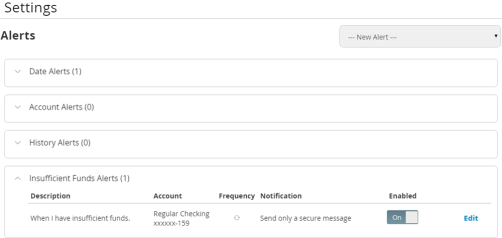
When you create an alert for an account, you specify the conditions that trigger the alert, as well as the way that you want to receive the alert. Alert conditions vary depending on the alert type. Available alert types may vary depending on your configuration.
| Alert Type | Description |
|---|---|
| Date | Reminds you of a specific date or event. |
| Account | Notifies you when the balance in one of your accounts drops below or rises above a specified threshold. |
| History | Notifies you when:
|
| Insufficient Funds | Notifies you when a transaction is rejected due to insufficient funds. |
| Transaction | Notifies you when the following transactions are generated:
The alert can trigger when the transaction is:
|
You do not need to be logged in to receive the alert. Secure messages and email alerts are sent immediately when they are generated. You can receive alerts through:
- Secure message (in online and mobile banking)
- Telephone call
- Text (SMS) message
Tip: You can specify the time to receive alerts in a telephone call or a text message.