User Role Features
The Features tab on the User Role Policy page lists the features assigned to a specific user.
Features tab example
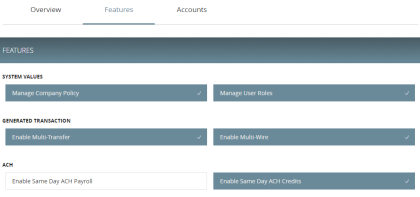
Depending on your configuration, the features may include some or all of the following:
| Option | Description |
|---|---|
| Manage Templates |
Grants access to all Customer templates for the enabled transaction types. To create or edit templates, Manage Recipients rights must be enabled. |
| Manage Recipients |
Create, edit, and delete recipients. |
| Manage Subsidiaries |
Create, edit, and delete subsidiaries. |
| Allow One-Time Recipient | User can add a recipient for a one-time payment. However, that recipient will not be saved. |
| Can View Existing Recipients | Users can view existing recipients for one-time payments. |
| Manage Users |
Add and delete users. |
| Statement Image |
View statement images. |
| Mobile Capture |
Use mobile banking to deposit checks. |
| Manage Company Policy |
Make changes to the Company Policy. |
| Manage User Roles |
Create, edit, and delete User Roles. |
| Information Reporting |
View and create reports from existing reports. |
| Multi-Transfer | Includes the ability to create multiple internal funds transfers from one screen and save the set of transfers as a template. End users can select a single processing date or different processing dates for all of the transfers. However, a single batch ID will be associated to each set of transfers to streamline approval and reconciliation. |
| Multi-Wire Origination | Includes the ability for end users to execute multiple domestic or international wire transactions from one screen and save the resulting set of wire transactions as a template. End users can select a single or different effective date for all of the transactions. However, a single batch ID will be associated for each wire to streamline approval and reconciliation. |
| Batch Wire Uploads | Includes the ability to import a comma separated (CSV) file including multiple domestic or international wires, replacing the need to manually key in wires. Uploaded wires will be represented as single transactions in activity center. However, a single batch ID will be associated for each wire to streamline approval and reconciliation. Only files containing the mandatory Fedwire and SWIFT fields will be supported and this service does not include the ability to create a wire outside of the CTR format. |
| Recipient Upload from Batch | Provides the ability for end users to access and view transaction details associated with incoming or outgoing domestic and international wire transactions. Connectivity to a real-time wire processor is required. The available data and timeliness of the data shown will be dependent on the integration made available by the third party service wire system. |
| Incoming/Outgoing Wire Activity | Provides the ability for end users to access and view transaction details associated with incoming or outgoing domestic and international wire transactions. Connectivity to a real-time wire processor is required. The available data and timeliness of the data shown will be dependent on the integration made available by the third party service wire system. |
| Incoming Wire Alerts | Provides the ability for end users to set up incoming domestic and international wire alerts within Corporate Banking. Connectivity to a real-time wire processor is required. The available data and timeliness of the data shown will be dependent on the integration made available by the third party service wire system. |
| Account Labels | Provides the ability for a user to add labels to accounts within the Company Policy page where the labels can be associated with entitlements and information reporting, resulting in increased efficiency and productivity. |
| Dual Action by Transaction Type | Some financial transactions require Dual Action approval by a different end user than the one who created it, even if the drafter has approval rights. This action is driven by dollar amount and can be set at the Group level; that setting applies at the Customer and User Role level as well. |
Depending on the combination of features, the user can perform different actions:
| Feature name | Allows you to |
|---|---|
| Allow One-Time Recipient |
Allows one-time recipients in a one-time payment flow that is not saved. If this feature and Manage Recipients are enabled, then the user can “Create Recipient” as a permanent record or click or tap OK to add them as a one-time recipient. If this is not enabled and Manage Recipients is enabled, the user can only select Create Recipient as a permanent record. If both this feature and Manage Recipients are not enabled, the user cannot see the existing recipient list when drafting a one-time payment unless "Can view all recipients" is enabled. The "Can view all recipients" option allows the user to see the existing list when making a one-time payment. |
| Can View Existing Recipients |
Allows the user to only pick from the existing recipient list when making a one-time payment. If this feature and Manage Recipients are enabled, then the user can see all recipients in a one-time payment flow and create new permanent recipient records in workflow. If this is enabled and Manage Recipients is not enabled, the user can see all recipients in a one-time payment flow, but cannot create new permanent recipient records in the workflow. If this feature is disabled and Manage Recipients is enabled, the user can see all recipients in a one-time payment flow and create new recipient records in workflow. If this feature and Manage Recipients are not disabled, the user cannot see all recipients in a one-time payment flow and cannot create new recipient records in workflow. If Allow one-time recipient is on, the user can create a one-time recipient in the one-time payment flow. |
Rights have different effects on payments, so use caution before making changes to a feature.
See Rights to access features for more information.