Editing approval limits for User Roles
Edit approval limits to set the maximum transaction approval limits by Transaction Type for the User Role.
Limits for User Roles
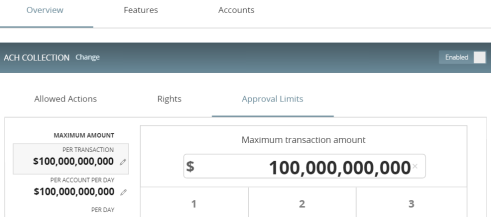
To edit approval limits
- In the navigation , click or tap Commercial > User Roles.
- Click or tap the edit icon (
 ) in the desired
User Role's row.
) in the desired
User Role's row. -
- Click or tap the Approval Limits tab to see a list of limits. The limits will vary depending on your configuration.
- Edit limits on the maximum transaction amounts by editing the following values:
- Per transaction
- Per account per day
- Per day
- Per month
- Edit limits on the maximum count (the maximum number of transactions) by editing the following values:
- Per account per day
- Per day
- Per month
- Click Save to save changes. A message appears confirming the policy changes.
- Click or tap Close to return to the Approval Limits page.
Note: Where limits conflict with a higher-level setting, the limit will be highlighted in red. Contact our financial institution for more information.